CSS Box Model

In this article, you will learn everything about CSS Box Model and how to design perfect containers using CSS Box Model.
Introduction
CSS Box Model gives basic CSS properties essential in providing characteristic position and design to an HTML element. Whenever we create an HTML file, each element present in it are represented as a rectangular box by the browser. You can easily see this thing by simply applying an outline to all the elements in any website. Just inspect any website and give this CSS property:-
* {
   outline: 1px solid red !important;
}
You will get something like this where you can simply see what above paragraph is trying to tell and it proves that each element present in HTML file are represented as a rectangular box.

According to the CSS Box Model standard, we can change the size, position, and properties (color, background, border size, etc.) of these boxes. A box has four parts that are customizable. these parts are:-
Content Area
Padding Area
Border Area
Margin Area
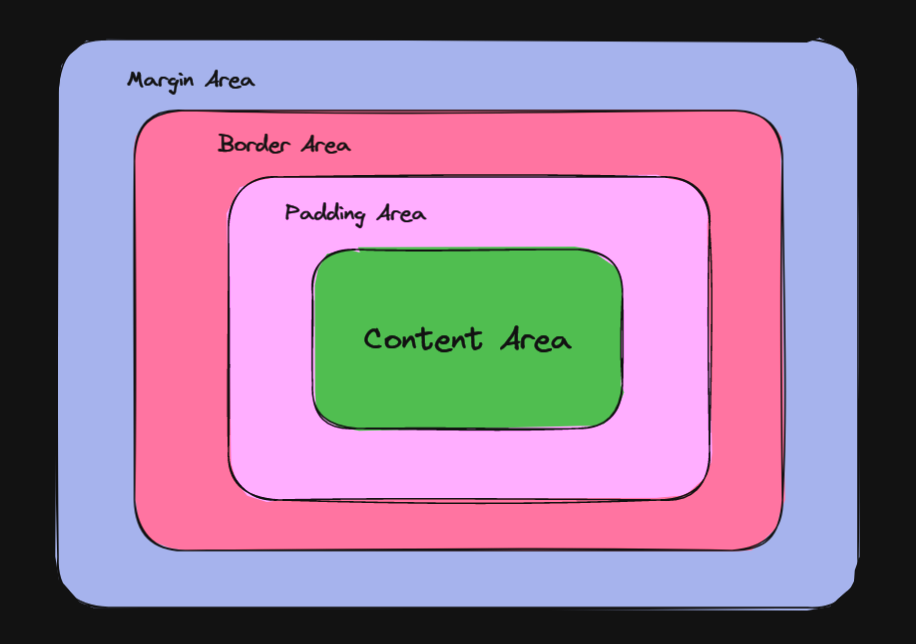
The content area is the centermost part of the box and the padding area comes next then the border area then the margin area. In this article, we will be discussing these areas in depth.
Content Area
This is the centermost area of the Box where the content is present. The content can be text image video player and so on. Its dimensions are the width of the content (or content-box width) and the height of the content (or content-box height). By default width and Height of the content area is defined by the size of the content. But, we can also set a particular size to The Box according to which dimensions of the content area is affected. Here comes box-sizing property in the picture.
box-sizing :-
This CSS property is used to define how the total width and height of an element is calculated. By default its value is content-box which means if we give width to the box having box-sizing as content-box this width is given only to the Content Area , and the value given to the padding border and margin are added up in the final width. It also has border-box the value which means padding and border values are also included if we give width property to the box and the final width will be the same.
Padding area
Padding area is a space generated between the content area and the border. Padding extends the content area to include the element's padding. The padding area has the same background color property as of content area. The thickness of the padding is determined by the padding-top, padding-right, padding-bottom, padding-left, and shorthand padding properties.
Border Area
Border area is the space generated between padding and the margin. Border extends the padding area to include the element's borders. The thickness of the border area is determined by the border-width and shorthand border properties. If the box-sizing property is set to border-box, the border area's size can be explicitly defined with the width, min-width, max-width, height, min-height, and max-height properties.
Margin Area
Margin area is the outermost part of the Box. It is the extra or empty space which we give to separates it from its neighbouring elements or boxes. margin extends the border area to include an empty area used to separate the element from its neighbors. The size of the margin area is determined by the margin-top, margin-right, margin-bottom, margin-left, and shorthand margin properties.
Designing Layout with CSS Box Model
Lets create a basic box using CSS Box Model. Create a div element in HTML and give it class = "box". Now we will target this box class using CSS. Starting with giving width and height to the box and then giving padding using padding shorthand property. After this lets give border width and border color using border shorthand property. Following this lets give Margin to the box using margin shorthand property. Your basic CSS Box Model layoutis ready.
<!DOCTYPE html>
<html lang="en">
<head>
    <meta charset="UTF-8">
    <meta http-equiv="X-UA-Compatible" content="IE=edge">
    <meta name="viewport" content="width=device-width, initial-scale=1.0">
    <title>Document</title>
    <link rel="stylesheet" href="./cssBoxModel.css">
</head>
<body>

    <div class="box">
        This is a box with width and hight equal to 100px. <br />
        Lorem ipsum dolor sit amet consectetur adipisicing elit. Eligendi, rem.
    </div>

</body>
</html>
body{
    background: #CAD5E2;
}

.box {
    width: 200px;
    height: 200px;
    padding: 50px;
    border: 50px solid purple;
    color: #CAD5E2;
    font-size: 20px;
    font-weight: 900;
    text-align: center;
    background: #758283;
    margin: 100px;
}
Output of the above code will be:
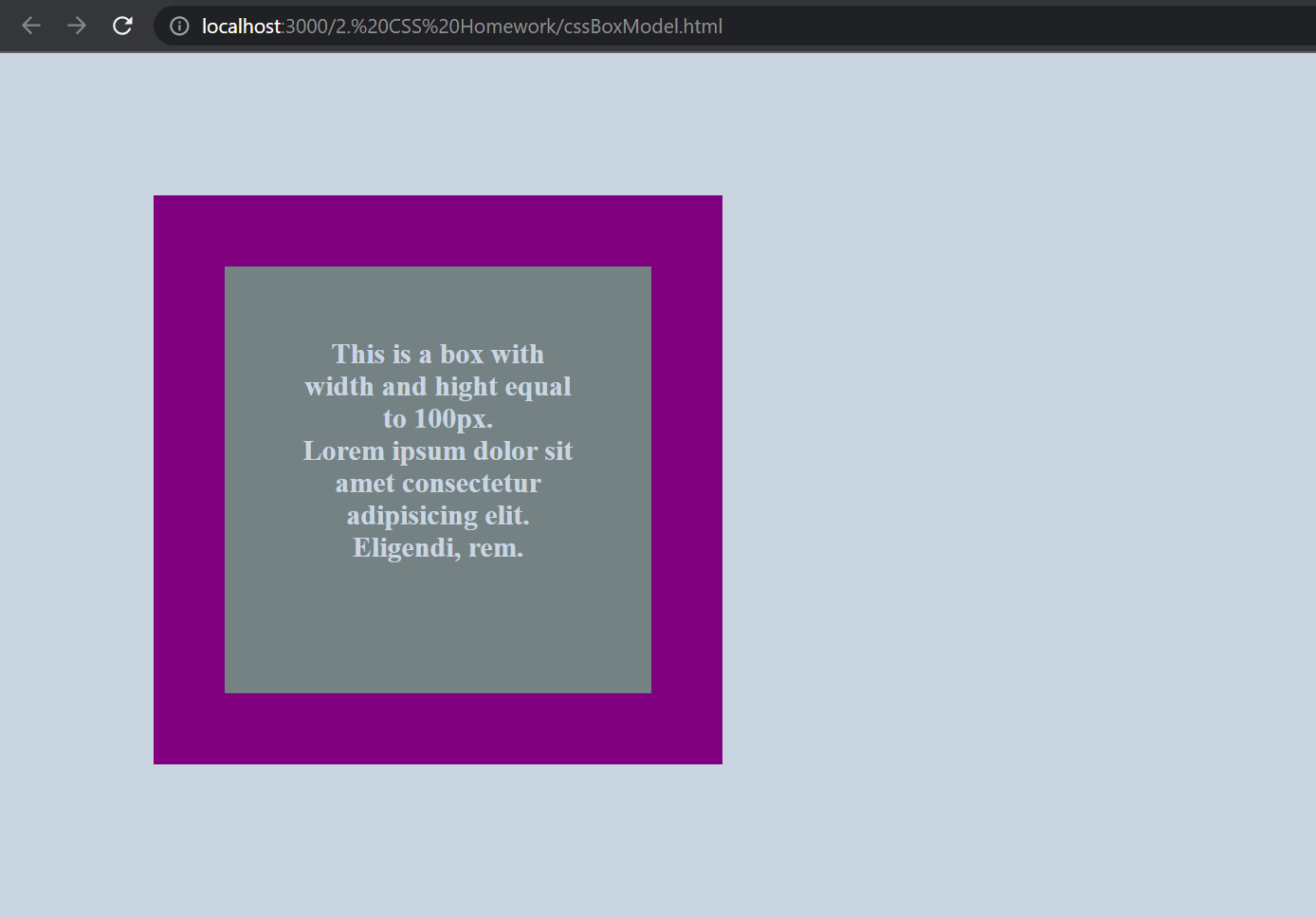
In the above Image Purple colored box is the border, grey colored box is padding and inside it text is present in content area. An empty space can be seen from top and left of the web page which is mardine. It surrounds the purple color box with thickness of 100px.
Here comes the end of the Article. I had explained in depth about CSS BOX MODEL. Hope you like it. Thanks for reading our blog. Happy Coding.


